|
INTRODUCTION
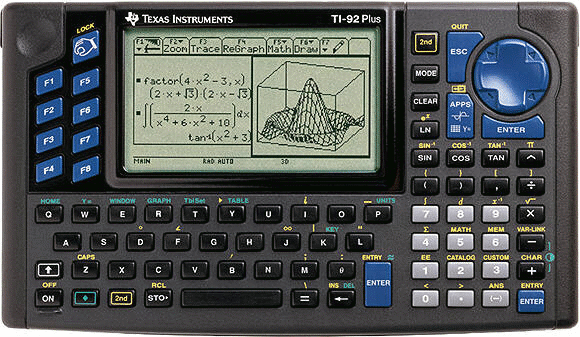
The TI-92 Plus was available as both a standalone calculator and a module upgrade to the TI-92. It added additional memory, flash-upgradable ROM, and advanced mathematics software. A TI-92 Plus is functionally almost identical to a TI-89. The Voyage 200 has since replaced the TI-92 Plus, since it offers additional features.
PHOTOS
Click for a larger version.
MODEL SPECIFICATIONS
|
TI-92 Plus
|
|
CPU
|
10 MHz MC68000
|
|
Memory
|
256K RAM (188K available to user), 2M Flash ROM (about 702K available to user)
|
|
Screen Size
|
240x128 pixels
|
|
Link Port?
|
Yes
|
|
CBL/CBR Support?
|
Yes
|
|
ViewScreen Model Available?
|
Yes
|
|
TI-Presenter Compatible?
|
Yes
|
|
TI Keyboard Compatible?
|
Yes
|
|
TI-Navigator Compatible?
|
Yes
|
|
OFFICIAL INFORMATION
» TI Connect for the TI-92 Plus
» TI-Graph Link for the TI-92 Plus
» Guide Books from Texas Instruments
OFFICIAL UPGRADES
» TI Connect
The TI Connect is the latest link cable produced by TI. It has a higher data transfer rate than the TI-Graph Link cable. It's a USB cable and lets you transfer data files (such as programs) between your calculator and your computer.
» TI-Graph Link
The TI-Graph Link is the older link cable produced by TI. It does not have as high of data transfer rate, but it does work wih almost all calculators. It connects to your serial port and like TI Connect is widely used to transfer data files (such as programs) between your calculator and your computer.
ROM VERSIONS
From time to time, TI will update the internal code of their calculators to
work around bugs, optimize functions, and even add features. This results in
several versions of each calculator in the marketplace. You can check the ROM
version of your TI-92 Plus using the following key sequence and reading the
number on your screen:
[F1] [A]
Known ROM versions:
- 1.00 (21 May 1998)
- 1.01 (5 Aug 1998)
- 1.05 (2 June 1999)
- 2.03
- 2.04
- 2.05
- 2.06
- 2.07
- 2.08
- 2.09
UNOFFICIAL UPGRADES
» IR Link
The IR Link allows you to control infrared devices from your calculator or
communicate with other calculators (to play games or chat) over a wireless
connection.
» Link Cables
Link cables let you transfer data files (such as programs) between your
calculator and your computer.
BASIC PROGRAMMING
BASIC programming on the TI-92 Plus is identical to that of the TI-92.
» Tutorials at TI-Freakware
» TI-Basic Developer
ASSEMBLY PROGRAMMING
Assembly language programming capability is built-in to the TI-92 Plus.
Assembly programs written for the TI-92 must be modified to support the TI-92
Plus.
For software development, we recommend GCC4TI.
» Techno-Plaza Programming Lessons
» _NOSTUB Assembly Programming for the TI-89/92+
by Kevin Kofler
» Tutorial ASM (fr)
by Pascal Martin
» Tutorial C (fr)
by Pascal Martin
» Tutorials at TI-Freakware
» WikiTI
EMULATORS
Several emulators are available to let you simulate TI calculators on your
computer. To locate available emulators and learn how to download a ROM image from your calculator, see our
Emulators page.
|