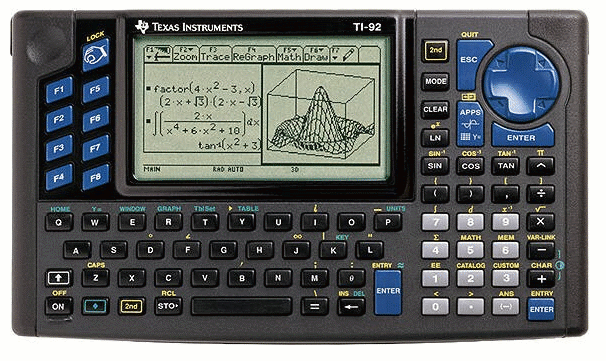
|
INTRODUCTION
The TI-89 sported all of the power of a TI-92 Plus, but in a traditional
handheld design. Along with the TI-92 Plus and Voyage 200 it was one of TI's most sophisticated
calculators, with such features as 3D graphing, upgradable flash ROM, built-in
assembly language programming, and a generous amount of user-available memory. The TI-89 Titanium has since replaced this model.
PHOTO
Click for a larger version.
MODEL SPECIFICATIONS
OFFICIAL INFORMATION
» TI Connect for the TI-92
» TI-Graph Link for the TI-92
» Guide Books from Texas Instruments
OFFICIAL UPGRADES
» TI-92 II
The TI-92 II was first introduced in 1996. It added an additional 128K user available memory and multi language support. It is also about 50% to 80% tmes faster than the Ti-92. The TI-92 II is one of the main reasons that Fargo II was developed.
» TI-92 Plus
The TI-92 Plus module adds 500K more memory, flash upgradability, and
Advanced Mathematics Software.
» TI Connect
The TI Connect is the latest link cable produced by TI. It has a higher data transfer rate than the TI-Graph Link cable. It's a USB cable and lets you transfer data files (such as programs) between your calculator and your computer.
» TI-Graph Link
The TI-Graph Link is the older link cable produced by TI. It does not have as high of data transfer rate, but it does work wih almost all calculators. It connects to your serial port and like TI Connect is widely used to transfer data files (such as programs) between your calculator and your computer.
ROM VERSIONS
From time to time, TI will update the internal code of their calculators to
work around bugs, optimize functions, and even add features. This results in
several versions of each calculator in the marketplace. You can check the ROM
version of your TI-92 using the following key sequence and reading the number
on your screen:
[F5] [DIAMOND] [(]
Known ROM versions:
- 1.0b1 (13 Sept 1995)
- 1.2 (11 Oct 1995)
- 1.3 (20 Oct 1995)
- 1.4 (17 Nov 1995)
- 1.5 (2 Jan 1996)
- 1.7 (18 Jan 1996)
- 1.8 (28 Feb 1996)
- 1.10 (20 March 1996)
- 1.10 (26 March 1996)
- 1.11 (11 Apr 1996)
- 1.12 (8 May 1996)
- 2.1 (19 Aug 1996)
UNOFFICIAL UPGRADES
» IR Link
The IR Link allows you to control infrared devices from your calculator or
communicate with other calculators (to play games or chat) over a wireless
connection.
» Link Cables
Link cables let you transfer data files (such as programs) between your
calculator and your computer.
» TI-92 Turbo Page
These modifications to your TI-92 can overclock the calculator to 3-4 times its original speed.
BASIC PROGRAMMING
BASIC programming on the TI-92 is identical to that of the TI-89, TI-92 Plus and Voyage 200.
ASSEMBLY PROGRAMMING
History: Assembly language programming was not supported by TI when the
TI-92 was released. As with the TI-85 and TI-82, the calculator had to be
"hacked" to enable assembly programming.
It was discovered that sending a memory backup from the
computer to the calculator with excess information would cause an overflow into
other areas of memory. The correct amount of overflowing data was deduced, and
placed in such a position that it would overwrite the 68000's vector table,
which points to routines that the processor calls to handle certain events.
These routine pointers were modified to point to machine code in RAM. (Note:
this explanation is included solely for historical purposes. A better method
was discovered later; it does not require an oversized backup file.)
» Techno-Plaza Programming Lessons
» Tutorial ASM (fr)
by Pascal Martin
» Tutorial C (fr)
by Pascal Martin
EMULATORS
Several emulators are available to let you simulate TI calculators on your
computer. To locate available emulators and learn how to download a ROM image from your calculator, see our
Emulators page.
|