|
INTRODUCTION
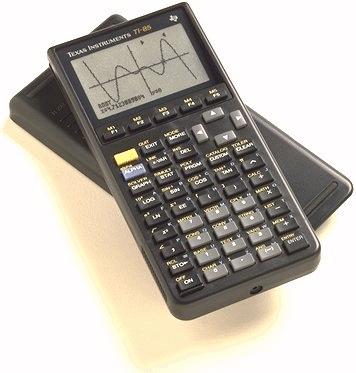
The TI-85 was designed as a powerful engineering and calculus calculator. It
was the first TI calculator to have a link port and assembly programming
capability (through an unintentional loophole). It has since been eclipsed by
the TI-86, which features TI-85 compatibility along with more advanced
features.
PHOTO
Click for a larger version.
MODEL SPECIFICATIONS
OFFICIAL INFORMATION
» TI Connect for the TI-85
» TI-Graph Link for the TI-85
» Guide Books from Texas Instruments
OFFICIAL UPGRADES
» TI Connect
The TI Connect is the latest link cable produced by TI. It has a higher data transfer rate than the TI-Graph Link cable. It's a USB cable and lets you transfer data files (such as programs) between your calculator and your computer. TI Connect will only work on Mac® computers.
» TI-Graph Link
The TI-Graph Link is the older link cable produced by TI. It does not have as high of data transfer rate, but it does work wih almost all calculators. It connects to your serial port and like TI Connect is widely used to transfer data files (such as programs) between your calculator and your computer.
ROM VERSIONS
From time to time, TI will update the internal code of their calculators to
work around bugs, optimize functions, and even add features. This results in
several versions of each calculator in the marketplace. You can check the ROM
version of your TI-85 using the following key sequence and reading the number
on your screen:
[2nd] [MODE] [ALPHA] [S]
WARNING: After entering the above key sequence, DO NOT PRESS ENTER! If you
do, your calculator's memory will be erased. Press any other key to exit back
harmlessly.
Known ROM versions:
- 1.0
- 2.0
- 3.0A
- 4.0
- 5.0
- 6.0
- 7.0
- 8.0
- 8.5V (ViewScreen model)
- 9.0
- 10.0
UNOFFICIAL UPGRADES
» Boosting the TI-85
These modifications to your TI-85 can overclock the calculator to 3-4 times its
original speed.
» IR Link
The IR Link allows you to control infrared devices from your calculator or
communicate with other calculators (to play games or chat) over a wireless
connection.
» Link Cables
Link cables let you transfer data files (such as programs) between your
calculator and your computer.
» Power Extension Page
The Power Extension instructions will show you how to use AA (instead of AAA)
batteries without making any modifications to your calculator.
» TI-85 Turbo Page
These modifications to your TI-85 can overclock the calculator to 3-4 times its
original speed.
» Electroluminescent Backlighting a TI-85
If you'd like to be able to use your TI-85 in the dark, these modifications will help you install electroluminescent backlighting in your calculator.
BASIC PROGRAMMING
BASIC programming on the TI-85 is nearly identical to the TI-86.
» Tutorials at TI-Freakware
ASSEMBLY PROGRAMMING
History: Assembly language programming was not supported by TI when the
TI-85 was released. As with the TI-81, TI-82 and TI-92, the calculator had to be
"hacked" to enable assembly programming.
An analysis of memory backups sent to a computer showed that items
in the CUSTOM menu were represented in the backup as pointers to memory
locations. Assembly code was stored in a string variable and sent to the
calculator in a fixed position - the first variable sent after a memory erasure
- and its memory address was found after another backup to the computer. This
address was placed in a CUSTOM menu entry field in the backup file, the file
was sent back to the calculator, and when the CUSTOM entry was selected, it
executed the new assembly code.
» TI-85 Assembler Programming
by Greg Parker
» TI-85 ZShell Programming with CAZ
by Miklos Bergou
» Usgard Programming: Lesson 1
by Terry Peng
» Usgard Programming: Lesson 2
by Terry Peng
» The Guide
by Jimi Malcolm
» Tutorials at TI-Freakware
EMULATORS
Several emulators are available to let you simulate TI calculators on your
computer. To locate available emulators and learn how to download a ROM image from your calculator, see our
Emulators page.
|