|
INTRODUCTION
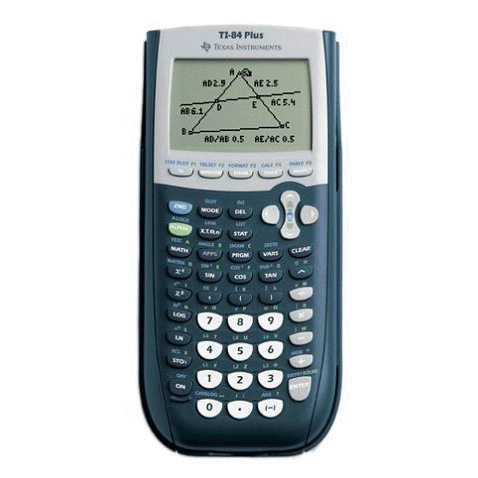
The TI-84 Plus is an upgrade to the TI-83 Plus. It remains completely compatible with
the TI-83 Plus. Its features include a new built-in clock, a new mini USB link port
in addition to the standard I/O port, added clock speed over the TI-83 Plus
and an increase in Flash ROM size. The TI-84 Plus has a newly designed case.
PHOTOS
Click for a larger version.
MODEL SPECIFICATIONS
|
TI-84 Plus
|
|
CPU
|
15 MHz ZiLOG Z80
|
|
Memory
|
32K RAM (24K available to user), 480K Flash ROM
|
|
Screen Size
|
96x64 pixels, 16x8 characters
|
|
Link Port?
|
Standard I/O & USB Mini Port
|
|
CBL/CBR Support?
|
Yes
|
|
ViewScreen Model Available?
|
Yes
|
|
TI-Presenter Compatible?
|
Yes
|
|
TI Keyboard Compatible?
|
Yes
|
|
TI-Navigator Compatible?
|
Yes
|
|
OFFICIAL INFORMATION
» Official TI-84 Plus home page at Texas Instruments
» TI Connect for the TI-84 Plus
» TI-Graph Link for the TI-84 Plus
» Guide Books from Texas Instruments
» TI-84 Plus/TI-84 Plus Silver Edition Manual
» Bid Specifications
» Graphing Calculator Comparison
» TI Online Store
OFFICIAL UPGRADES
» TI-84 Plus FLASH Downloads.
Download Handheld Software Applications (Apps) from Texas Instruments. These add many features to your TI-84 Plus including additional language support, StudyCards, text readers and many more.
» TI-84 Plus ROM Downloads.
Download ROM updates for your calculator from Texas Instruments. These updates typically fix bugs and or optimize features.
» TI Connect
The TI Connect is the latest link cable produced by TI. It has a higher data transfer rate than the TI-Graph Link cable. It's a USB cable and lets you transfer data files (such as programs) between your calculator and your computer.
» TI-Graph Link
The TI-Graph Link is the older link cable produced by TI. It does not have as high of data transfer rate, but it does work with almost all calculators. It connects to your serial port and like TI Connect is widely used to transfer data files (such as programs) between your calculator and your computer.
ROM VERSIONS
From time to time, TI will update the internal code of their calculators to
work around bugs, optimize functions, and even add features. This results in
several versions of each calculator in the marketplace. You can check the ROM
version of your TI-84 Plus using the following key sequence and reading the
number on your screen:
[2nd] [MEM] [1]
- 2.21
- 2.22
- 2.30
- 2.40
- 2.41
- 2.43
- 2.53MP
- 2.55MP
UNOFFICIAL UPGRADES
» Link Cables
Link cables let you transfer data files (such as programs) between your
calculator and your computer.
» Power Extension Page
The Power Extension instructions will show you how to use AA (instead of AAA)
batteries without making any modifications to your calculator.
BASIC PROGRAMMING
BASIC programming on the TI-84 Plus is compatible with that of all the TI-83 Plus series calculators including the TI-84 Plus Silver Edition.
Books:
» Programming the TI-83 Plus/TI-84 Plus by Christopher Mitchell
Online resources:
» TI-82 BASIC Tips & Tricks Vol. 1
by David Dynes
» The Vortex: TI-83+ BASIC Programming
by Wes Cronk
» TI-83 Plus BASIC: A Beginners' Guide
by Boris Cherny
» TI-Basic Developer
» Tutorials at TI-Freakware
ASSEMBLY PROGRAMMING
Assembly language programming capability is built into the TI-84 Plus.
Asembly programs that have been previously made for the TI-83 Plus should be compatible and work with the TI-84 series of calculators. However any assembly programs made for the TI-83 will NOT work without modification of the code.
For software development, we recommend Brass, included with the Doors CS SDK, or SPASM.
» The Guide
by Jimi Malcolm
» TI Flash Studio
by Texas Instruments
» The Vortex: Ti-83+ ASM Programming
by Wes Cronk
» Learn TI-83 Plus Assembly In 28 Days
by Sean McLaughlin
» Tutorials at TI-Freakware
» WikiTI
EMULATORS
Several emulators are available to let you simulate TI calculators on your
computer. To locate available emulators and learn how to download a ROM image from your calculator, see our
Emulators page.
|