|
INTRODUCTION
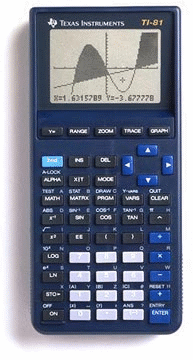
The TI-81, TI's first graphing calculator, was designed for algebra and
precalculus. It has since been replaced by newer models which have faster
processors, more memory, and popular features such as linking capability and
flash upgradability. The TI-81 drew little in the way of third-party games
and other programs, since the code must be typed into the calculator by hand.
PHOTO
MODEL SPECIFICATIONS
OFFICIAL INFORMATION
» Guide Books from Texas Instruments
ROM VERSIONS
From time to time, TI will update the internal code of their calculators to
work around bugs, optimize functions, and even add features. This results in
several versions of each calculator in the marketplace. You can check the ROM
version of your TI-81 using the following key sequence and reading the number
on your screen:
[TEST] [ALPHA] [S]
WARNING: After entering the above key sequence, DO NOT PRESS ENTER! If you
do, your calculator's memory will be erased during the self-test sequence. Press
any other key to exit back harmlessly.
Known ROM versions:
- 1.0 (Engineering samples and very early units)
- 1.1
- 1.1K
- 1.5K
- 1.6K
- 1.8K
- V2.00
- V2.0V
UNOFFICIAL UPGRADES
» Power Extension Page
The Power Extension instructions will show you how to use AA (instead of AAA)
batteries without making any modifications to your calculator.
» TI-81 Turbo Page
Internal modifications to your TI-81 can overclock the calculator to 3-4 times
its original speed.
ASSEMBLY PROGRAMMING
History: Assembly language programming was not supported by TI when the TI-81 was released. As with the TI-82, TI-85, and TI-92, the calculator had to be "hacked" to enable assembly programming.
With the TI-81's lack of a link port and thus no possibility of directly manipulating RAM, assembly programming on this model was for years simply considered impossible by definition, and the concept was completely ignored. A surprise came in 2009, nearly two decades after the TI-81's introduction, when a method was devised of executing arbitrary machine code using only the keyboard. The method exploits a bug in the ROM that allows the processor stack to overflow into the user RAM area, which can then be manipulated by modifying the contents of certain calculator variables.
Unfortunately, given the need to execute a complex and lengthy series of keystrokes, type in programs by hand, the lack of RAM, and the increasing rarity of this long-discontinued model, TI-81 assembly programming is perhaps more of a novelty than a practicality.
» TI-81 Software Environment Documentation
» TI-81 ASM hook interrupt
» Unity (TI-81 assembly loader)
EMULATORS
Several emulators are available to let you simulate TI calculators on your
computer. To locate available emulators and learn how to download a ROM image from your calculator, see our
Emulators page.
|