|
Save and Restore Mode Settings
|
|
FILE INFORMATION
Ranked as 30159 on our all-time top downloads list with 1785 downloads.
Ranked as 11422 on our top downloads list for the past seven days with 2 downloads.
|
set.zip
|
|
Filename
|
set.zip (Download)
|
|
Title
|
Save and Restore Mode Settings
|
|
Description
|
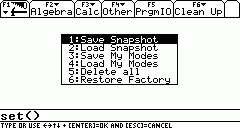
If you use the Voyage 200 for different purposes, let's say: in the morning for algebraic calculations and in the evening for accounting, you have to change mode settings all the time. Take an example: For a normal tax calculation you can't use "Auto" or "Exact" and "float" - you need "Approximate" and perhaps "FIX 2". This small program gives you the option to save up to nine ModeSetting-configurations using a name of your choice and restore them easily. You can also make a snapshot of the current configuration and "play" with it. If you messed something up, you can restore your own previous settings or the factory settings without guessing or resetting the Voyage 200. It's just a small freeware tool, which can be quite useful. Tested on Voyage 200 with OS 2.09.
|
|
Author
|
Werner Lauff (lauff@lauff.org)
|
|
Category
|
Voyage 200 BASIC Misc. Programs
|
|
File Size
|
2,866 bytes
|
|
File Date and Time
|
Sun Oct 19 21:07:07 2003
|
|
Documentation Included?
|
Yes
|
|
SCREEN SHOTS
REVIEWS
There are no reviews for this file.
LEAVE FEEDBACK
Questions, comments, and problems regarding the file itself should be sent directly to the author(s) listed above.
Write a review for this file (requires a free account)
Report inappropriate or miscategorized file (requires an account; or you may email us directly)
If you have downloaded and tried this program, please rate it on the scale below
ARCHIVE CONTENTS
|
|
|

