ticalc.org
Basics Archives Community Services Programming
Hardware Help About Search Your Account
   Home :: Archives :: File Archives :: Integrated Desktop v0.2d for 89/92+/V200 AMS 2.07/2.08
Integrated Desktop v0.2d for 89/92+/V200 AMS 2.07/2.08

FILE INFORMATION

Ranked as 468 on our all-time top downloads list with 18811 downloads.
Ranked as 514 on our top downloads list for the past seven days with 19 downloads.
Ranked as 48 on our top rated list with a weighted average of 8.67.

id.zip
Filename id.zip
Title Integrated Desktop v0.2d for 89/92+/V200 AMS 2.07/2.08
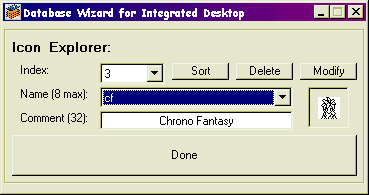
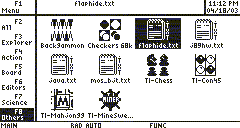
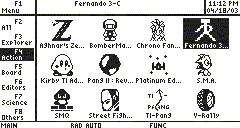
Description [[[v0.2d - UPDATE : Support for Greg Dietsche's Super Start Flash App added ! ]]] Integrated Desktop is the first shell with icons display integrated to the OS. It allows to use the Desktop of the latest AMS versions as a launcher for ASM, PPG (compressed), TI-BASIC programs and of course Flash Apps. Integrated Desktop can also run an extern text viewer to view text files. With ID you can now organize as you wish your programs and your texts in the Desktop folders, and run or view them by clicking on their icons as if they were real Flash Apps ! ID installs also the same numerical shortcuts as in the APPS menu, to use them even in the Desktop, and support kbdprgms in the Desktop, even PPG and TEXT ones ! An Icon Editor is provided is this package to create your own icons and program descriptions to display on the Desktop. An on-calc editor has also been programmed and is available separately (just below in asm/misc directory).
Authors Christophe M-N (ximoon@yaronet.com)
Olivier Armand (olivier.calc@gmail.com)
Category TI-89 Assembly Misc. Programs
File Size 109,818 bytes
File Date and Time Sun Jun 1 19:47:07 2003
Documentation Included? Yes
Source Code Included? Yes

SCREEN SHOTS

RATING

If you have downloaded and tried this program, please rate it on the scale below
BadGood
1  2  3  4  5  6  7  8  9  10  

REVIEWS

Review
Review by  Marty McNeal
Reviewed on 2004-12-22
Is “Integrated Desktop” just another space wasting file explorer? When I first started to download games for my TI-89, I could never figure out how to access all of them quickly. “PreOS” and other shells like it help to access files without typing them into the command line, but they only recognize some files. I still had to type in games like ''Command 2 Conquer". The file browsers that I saw, like "TICT Explorer," had tons of features that I didn't need, huge file sizes, and boring interfaces. I kept thinking, “Why doesn’t someone tap into the built-in apps desktop?” Then I found just that. “Integrated Desktop,” “I.D.” for short, has five glowing pros: file size, looks, customizability, glitch protection, and compatibility. It only has one con, a small built-in database.

“I.D.'s” file size is very tiny because it taps into the existing integrated desktop, hence the name. This program has one file for activation, one file to back up settings, and one database file of shortcuts. If your calculator never needs resetting (as if!), all three of these file can be deleted and the program still works.

“I.D.” looks a little like a computer desktop without a cursor. Each shortcut has a picture, a name, and a comment that appears at the top of the screen when it’s highlighted.

It allows the user to customize and name up to six categories. These are opened with keys [F3] through [F8], [F1] is the menu, and [F2] lists all available shortcuts. It’s like having six completely different desktops. Personally, I use one for tools, one for games, and one for spare shortcuts that I rarely use. A separate database editor is available for either PC or directly on the calculator. It makes and changes shortcuts. This is a useful feature if you have programs that aren't on the default database or if you just don't like the pictures and names that it uses. It's easy to draw new icons with a paint program; the guidelines are in the "readme."

The glitch protection that comes in “I.D.” will not protect anything on the calculator, but it is still very useful. It involves a built in shortcut called "Refresh Desktop." This program does two things when it is run. First, it does what it says. It refreshes the desktop, allowing any newly downloaded programs to be detected by the desktop and possibly cleaning the screen if a game screws it up. Secondly, it saves the category settings to the previously mentioned settings file. This means that they don't have to be painstakingly renamed and sorted after a crash and/or RAM reset.

“I.D.” is compatible with “PreOS” and “Super Start,” a program that allows .ppg compressed programs to run without separate .asm files. This means that any program can work from the integrated desktop. Some nostub programs that run with “Super Start,” however, work on the command line, but not in “I.D.” when a shell isn’t installed. I don’t know why; I am not a programmer. The trick I use is to install “PreOS” without the larger file “STDLIB.” This fixes the problem, uses very little memory, and adds a little crash protection. Version .69 is best because later versions don’t work without “STDLIB.” Beyond that, anything should work.

My only, and minimal, complaint is the lack of program shortcuts that come with the default icons file. I highly recommend that people submit their homemade “idicons” files to this site. It could even turn into an interesting icon art competition.

I hope that this review helps people to discover “Integrated Desktop” and clears up a little confusion caused by Olivier Armand’s English. I am extremely happy with “Integrated Desktop” and look forward to Olivier’s next work.


See 2 more reviews

ARCHIVE CONTENTS

Archive Contents
Name Size
ID/src/h220xtsr/h220xtsr.a    1652
ID/src/h220xtsr/h220xtsr.h    3089
ID/src/h220xtsr/h220xtsr.asm    17041
ID/src/h220xtsr/h220xtsr.tpr    329
ID/src/h220xtsr/h220xtsr.txt    15979
ID/src/build.bat    1040
ID/src/build.pif    967
ID/src/functions.h    1386
ID/src/install.c    17650
ID/src/install_sub.h    4646
ID/src/tsr.h    52830
ID/src/TIFSimport.h    1953
ID/src/RD_icon.h    1521
ID/src/macros.h    1830
ID/src/structures.h    3026
ID/src/id.tpr    616
ID/LisezMoi.txt    18865
ID/ReadMe.txt    16429
ID/id.9xz    7045
ID/id.89z    7045
ID/IDEditor/IDEditor.Exe    44032
ID/IDEditor/LisezMoi.txt    6117
ID/IDEditor/readme.txt    5144
ID/IDEditor/SRC/IDEditor.ico    2494
ID/IDEditor/SRC/Integrated Desktop Prj.Vbp    742
ID/IDEditor/SRC/Integrated Desktop Prj.vbw    38
ID/IDEditor/SRC/Wizard.Frm    44581
ID/IDEditor/SRC/Wizard.frx    2510
ID/IDEditor/ttbin2oth.exe    5120
ID/IDEditor/Missing Dlls.txt    480
ID/Data Base Example/idicons_example.89y    4215
ID/Data Base Example/dicons_example.9xy    4215
ID/Data Base Example/Programs List.txt    3839
ID/Data Base Example/Liste des Programmes.txt    4230

REPORT INAPPROPRIATE FILES

We at ticalc.org try to keep our archives free of inappropriate material, but we're not perfect. We rely on our community of users to help catch inappropriate material that may occasionally slip through our screening.

Please see our Site Policies for a description of what is not allowed in our archives.

To report that you believe the file above contains inappropriate content, please use the form below. We will let you know what action we are taking, if any is necessary. In order to use this form, you must have a (free) ticalc.org account - this is required in order to limit the misuse of this feature. You can also email webmaster@ticalc.org - be sure to include all details about the file.

Please describe the content you feel is inappropriate:

  Copyright © 1996-2007, the ticalc.org project. All rights reserved. | Contact Us | Disclaimer