|
Jezzball 86
|
|
FILE INFORMATION
Ranked as 557 on our all-time top downloads list with 23791 downloads.
Ranked as 9428 on our top downloads list for the past seven days with 2 downloads.
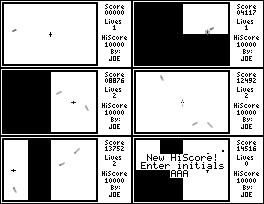
SCREEN SHOTS
REVIEWS
|
Review
|
|
Review by
|
 Devin Bayer Devin Bayer
|
|
Reviewed on
|
2004-11-22
|
Attention span: 10/10 Addictive with a good interface
Controls: 9/10 smart and easy to master
Implementation: 8/10 good
Overall: 9/10 A challenging classic arcade game
Jezzball 86 is a classic arcade style game. It is a must have for any TI-86 game collector. This updated version is very stable and has a well thought-out design. It has some things that I would like to see in more games; simplicity, versatility, and efficiency. If you know the game of Jezzball, which most of us do, then you know this game. The object is to section off 750f the screen by drawing lines vertically or horizontally. The challenge is that there are multiple balls bouncing around that will take away one of your lives if it hits your line while it is being drawn.
The title screen has only two options: speed and contrast increase. Speed is self explanatory, and contrast increase is this nifty little time saver that does what it says- increases the contrast. This is useful because the fast moving balls can sometimes be hard to see and the the contrast needs to be set higher then normal. It would be an annoyance to have to change the contrast every time play. Both these options can be set to the extremes and are adjusted with the use of a ingenius sliding bar. The bars' positions are saved permanetly, so in the future you can go right into the gameplay. The gameplay couldn't really get any better. Standard controls and a smart line direction changer make it a snap to master. If you last moved the cursor up or down, then the line will be drawn horizontally. If you last moved it left or right it'll be drawn vertically. You can also change the direction of the line by pressing F1. A high score is kept, and that's always useful for bragging to your friends after you become a pro at this very addictive game of skill. |
|
LEAVE FEEDBACK
Questions, comments, and problems regarding the file itself should be sent directly to the author(s) listed above.
Write a review for this file (requires a free account)
Report inappropriate or miscategorized file (requires an account; or you may email us directly)
If you have downloaded and tried this program, please rate it on the scale below
ARCHIVE CONTENTS
|
Archive Contents
|
|
Name
|
Size
|
| JEZZBALL.ASM | 37059 |
| README.TXT | 2763 |
| JEZZBALL.86P | 3497 |
|
|
|
|
|

